
Views: 0 Author: Site Editor Publish Time: 2026-08-04 Origin: Site


Many IT professionals mistakenly assume installing a rack-mounted uninterruptible power supply eliminates the need for dedicated power distribution hardware. You might think a UPS provides enough outlets for a small server deployment. Relying solely on a UPS for power distribution creates immediate problems. It leads to overloaded circuits, cable management chaos, and catastrophic downtime during localized grid failures.
IT environments require continuous, clean power alongside sufficient receptacle availability. You cannot achieve this with a single piece of hardware. We must reframe this discussion. It is not a competition between two devices. Instead, we evaluate how to correctly pair a server rack PDU with a UPS. This pairing builds a resilient, scalable, and manageable power architecture. Understanding the distinct roles of each component ensures your infrastructure handles current workloads and future expansions without risking outages.
Distinct Functions: A UPS generates temporary backup power and conditions incoming electricity; a server rack PDU distributes that power to multiple downstream devices.
Complementary Architecture: They are not mutually exclusive. Standard enterprise architecture places the UPS upstream to protect the load, and the PDU downstream to distribute the load.
Scalability Dictates Selection: Choosing between single-phase, 3-phase, or high-density PDUs depends entirely on the specific power draw (kW) of the rack and the capacity of the upstream UPS.
Redundancy is Mandatory: True enterprise reliability requires A/B power feeds, utilizing dual PDUs connected to separate UPS systems or utility feeds.
The primary function of a UPS is providing battery backup during power anomalies. It supplies essential runtime during complete outages, voltage sags, or power surges. This runtime allows servers to shut down gracefully or keeps them running until a backup generator starts. The UPS acts as the first line of defense against utility power instability. We typically deploy either line-interactive models for basic closets or double-conversion online models for sensitive enterprise gear.
Beyond battery backup, a UPS performs heavy power conditioning. It regulates voltage and suppresses surges. This conditioning ensures only clean, stable power reaches your sensitive IT equipment. Raw utility power often contains fluctuations that degrade internal server components over time. The UPS filters these anomalies out completely, acting as a firewall for your electrical feed.
A UPS has distinct physical limitations. Most rack-mounted units feature a limited number of output receptacles on their rear panels. Manufacturers build them for power storage and conditioning, not high-volume cable distribution. Plugging a dozen servers directly into a single UPS creates a tangled, unmanageable mess. It restricts airflow and limits your ability to scale the rack density as you add more hardware.
The primary function of a distribution unit is acting as the localized power hub inside the rack. It takes a single high-amperage feed from the upstream UPS and splits it into multiple lower-amperage outlets. This allows you to power dozens of devices from a single upstream connection safely and efficiently. We rely on these units to bridge the gap between heavy facility power and standard server plugs.
We must clarify the scope of this hardware. A localized rack unit differs entirely from large-scale facility distribution panels. Facility panels are massive floor-standing transformers that distribute power across multiple rows of racks. A rack unit is not a consumer-grade power strip. Consumer strips lack industrial components, high-temperature ratings, and continuous high-amperage capabilities. They use cheap thermal breakers that trip unpredictably. Professional units utilize hydraulic-magnetic circuit breakers that remain stable regardless of ambient rack temperatures.
Standard units do not generate power. They do not store power, nor do they provide battery backup. They rely entirely on the upstream source to supply electricity. Their job is strictly distribution and management.
Modern units offer advanced capabilities far beyond simple power distribution. Intelligent models feature remote switching, allowing administrators to reboot unresponsive servers from anywhere. They provide outlet-level metering for granular power consumption data. Many also support environmental monitoring, utilizing plug-in sensors to track rack temperature and humidity directly at the equipment intake.
Single-phase deployments operate on standard alternating current. These units typically run at 120V or 208/240V, depending on regional standards and facility wiring. They generally support a lower overall kilowatt capacity compared to multi-phase alternatives. A standard 120V, 20A circuit delivers a maximum of 2400 Volt-Amps, which derates to 1920 Watts for continuous loads per electrical code requirements.
A single phase server rack PDU fits specific environments perfectly. Network closets, edge computing deployments, and low-density server racks benefit most from this architecture. These environments typically house basic networking gear, a few lightweight servers, and storage arrays. The power draw remains relatively low and predictable.
For small-scale infrastructure, single-phase units offer an excellent operational baseline. Electricians can easily wire single-phase receptacles without specialized facility upgrades. This makes them the default choice for branch offices and small business IT rooms where heavy industrial power feeds are unavailable.
Three-phase power delivers electricity across three alternating currents. These currents peak at sequential times, providing a smoother, more continuous flow of power. These units typically operate at 208V or 400V/415V. This architecture significantly increases the total power capacity available to a single rack. You calculate the capacity by multiplying Volts by Amps by 1.732.
The efficiency gains of a 3 phase server rack PDU are substantial. It allows for better load balancing across the three phases. It reduces copper wiring costs because you deliver more power using fewer, smaller cables. Ultimately, it provides a much higher power delivery per rack, often exceeding 10kW to 22kW.
These deployments are standard in enterprise data centers and colocation facilities. Any rack housing dense virtualization clusters or enterprise storage arrays requires three-phase power. When rack power density exceeds 10kW, single-phase distribution becomes inefficient and physically cumbersome due to the sheer number of thick power whips required.
High-density computing requires massive amounts of localized power. AI workloads, blade chassis, and GPU clusters draw extraordinary amounts of electricity. A single rack in these environments can easily require 15kW to 60kW or more. Standard power distribution hardware simply cannot handle these loads without tripping breakers or melting internal components.
A high density server rack PDU is engineered specifically for these extreme environments. Because dense racks generate massive exhaust heat, these units require high-temperature ratings. Standard hardware might fail at 45°C. High-density units are rated for continuous operation at 60°C (140°F) or higher. This ensures reliability even in the hot aisle of a GPU cluster where server exhaust fans blow directly onto the chassis.
Integrating these high-density units requires specialized upstream hardware. The UPS systems feeding them must handle rapid load steps. When a GPU cluster spins up for a machine learning task, the power draw spikes instantly. The UPS and the distribution unit must accommodate this sudden inrush without dropping voltage or triggering overload protection. We often see these units utilizing heavy-duty IEC 60309 plugs or hardwired connections to handle the massive amperage.
Architecture Type | Typical Voltage | Max Capacity Range | Primary Use Case | Wiring Complexity |
|---|---|---|---|---|
Single-Phase | 120V / 208V | 1.4kW - 7.3kW | Edge closets, network racks | Low |
3-Phase | 208V / 400V | 8.6kW - 22kW | Enterprise data centers | Medium |
High-Density | 400V / 415V | 22kW - 60kW+ | AI clusters, GPU racks | High (Often hardwired) |
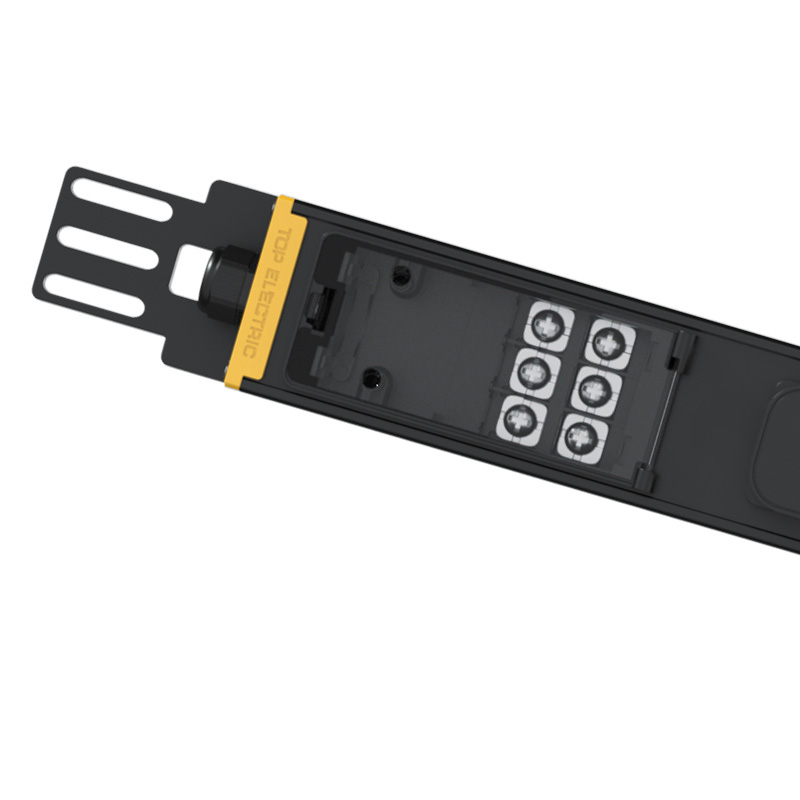
Basic units provide reliable, low-cost power distribution with no network connectivity. They are essentially industrial-grade power strips. They feature robust breakers and high-quality receptacles but offer no visibility into power consumption. They are best suited for strictly budget-constrained, unmanaged environments where IT staff are always on-site to physically check equipment.
Metered units introduce necessary visibility. They provide local LED displays or network-based power consumption data. You can see exactly how many amps the rack is drawing in real-time. This data is essential for capacity planning. In colocation environments, it enables accurate billing based on actual usage. Metering prevents circuit overloads by alerting administrators via SNMP or email before a breaker trips.
Switched units add relay controls to individual receptacles. This provides the capability to remotely turn individual outlets on or off via a web interface. Managed units combine switching capabilities with granular, outlet-level power metering. This represents the highest tier of power distribution intelligence available for rack infrastructure.
The operational outcome of remote switching is massive. It eliminates the need for remote hands to hard-reboot frozen servers. If a server locks up at 2:00 AM, an administrator can cycle the power from their laptop at home. This significantly reduces Mean Time to Recovery and cuts down on expensive late-night data center visits.
Another major feature is outlet-level sequencing. When restoring power after a complete UPS depletion, turning all servers on simultaneously creates a massive inrush current. This spike can immediately overload the UPS and trip the main breaker again. Switched units allow you to sequence outlet power-up with programmable delays. Server A boots, waits 10 seconds, then Server B boots. This ensures a smooth, safe power restoration across the entire rack.
Intelligence Level | Network Connectivity | Power Metering | Remote Switching | Best Application |
|---|---|---|---|---|
Basic | None | None | No | Unmanaged local closets. |
Metered | Yes (or local display) | Unit-level or Phase-level | No | Capacity planning, preventing overloads. |
Switched | Yes | Unit-level | Yes | Remote edge sites requiring hard reboots. |
Managed | Yes | Outlet-level | Yes | Enterprise data centers, granular monitoring. |
Understanding the standard power flow is mandatory for proper architecture. The standard topology maps out as follows: Utility Power flows to a Transfer Switch or Generator. From there, it flows to the UPS. The UPS then feeds the distribution unit. Finally, the unit distributes power to the IT Equipment. The UPS must always sit upstream to protect the entire downstream load.
Plugging a UPS into a distribution unit is an architectural error. This reversed topology creates severe bottlenecks. A UPS draws significant current, especially when recharging depleted batteries while simultaneously powering the load. Plugging it into a standard receptacle risks overloading that specific circuit or the entire unit. Always plug the UPS directly into the facility wall receptacle or hardwire it to the main panel.
Small and medium-sized businesses often face a common dilemma. If a rack-mounted UPS already has 8 to 10 receptacles, why buy a separate distribution unit? It seems redundant to purchase more hardware when empty plugs are available on the battery backup.
Adding a distribution unit provides significant operational benefits regardless of available UPS outlets. First, it preserves the lifespan of the UPS receptacles, which are often fragile and prone to wear. Second, it drastically simplifies cable management. You can mount a vertical unit in the back of the rack, keeping short power cords neatly organized. Third, it allows for seamless UPS maintenance. If the UPS fails, you can move the single distribution plug to utility power temporarily. If all servers were plugged directly into the UPS, you would have to un-cable every individual server to replace the unit.
Enterprise reliability demands a 2N redundancy model. Most modern servers feature dual power supplies. To achieve true redundancy, these power supplies must connect to completely separate power paths. This eliminates any single point of failure within the rack infrastructure.
The standard configuration requires two independent distribution units. Unit "A" connects to UPS "A", which is fed by Utility Feed A. Unit "B" connects to UPS "B", which is fed by Utility Feed B. We highly recommend color-coding these paths. Use red cables for the A side and blue cables for the B side. If UPS A fails, or if Utility Feed A goes down, the server continues running on the B side without interruption.
Legacy equipment often features only a single power cord. To integrate single-corded devices into an A/B architecture, you must use an Automatic Transfer Switch. The ATS plugs into both the A and B sides. The single-corded device plugs into the ATS. If the primary power feed fails, the ATS switches to the secondary feed in milliseconds, keeping the device online.
Physical installation dictates cable management efficiency and airflow. You must choose between Zero U (vertical) and 1U/2U (horizontal) mounting. Zero U units mount vertically in the rear corners of the rack. They consume no standard rack space and place receptacles directly next to server power supplies. Horizontal units consume valuable rack space but are necessary for shallow racks or specific switching configurations.
When using horizontal units, placement matters. Top-of-rack mounting keeps power cables away from data cables routed at the bottom. It requires longer power cords to reach a bottom-mounted UPS. Bottom-of-rack mounting keeps heavy power cables short but can interfere with network routing. You must factor in server power cord lengths and proximity to the UPS when deciding.
Rear-mounting Zero U units offers the best cable management ease. You must balance this with the placement of heavy UPS units. UPS batteries are extremely heavy. They must always be bottom-mounted to maintain rack stability and a low center of gravity. Never mount a UPS high in a rack, as it creates a severe tipping hazard during maintenance.
Redundant A/B setups carry a hidden danger: cascading failures. If the A side fails, the entire rack load instantly shifts to the B side. If the B side is already running at 70% capacity, the sudden addition of the remaining load will trip its breaker. This causes the entire rack to go dark, defeating the purpose of redundancy.
You must follow a strict rule of thumb for capacity planning. Never load a single distribution unit past 40% in a redundant configuration. If both units run at 40%, a failure on one side means the surviving unit jumps to 80%. This keeps it safely under its maximum rating. Continuous monitoring is essential to ensure load creep does not violate this rule as you add new servers over time.
Intelligent power hardware introduces network security risks. Connecting intelligent management cards directly to the public internet is highly dangerous. Hackers routinely scan for exposed power infrastructure. If compromised, an attacker can remotely turn off your entire data center.
You must implement strict mitigation tactics. Isolate all management interfaces on dedicated, non-routable VLANs. Enforce SNMPv3 for encrypted monitoring. Disable insecure protocols like Telnet and HTTP immediately upon deployment. Maintain aggressive firmware update schedules to patch known vulnerabilities in the management cards.
The debate between these two power components is a false dichotomy. A reliable, professional IT environment requires both. You need a UPS for power continuity, surge protection, and battery runtime. You must pair it with a distribution unit for safe, scalable, and manageable power delivery. Attempting to bypass either component compromises the stability of your infrastructure.
Your shortlisting logic should follow a clear path. Base your UPS selection on total rack wattage and required battery runtime. Base your distribution selection on phase requirements, rack density, plug types, and the necessity for remote management capabilities. Aligning these specifications ensures a resilient power chain.
Take the following steps to finalize your power architecture:
Audit your current and projected rack power draw in Watts to size the UPS correctly.
Inventory your IT equipment plug types and count the total number of receptacles needed.
Determine your phase requirements based on your facility's electrical capabilities.
Define your redundancy requirements to dictate the number of power feeds.
Isolate a dedicated management VLAN for secure deployment of intelligent power hardware.
A: No, this is not recommended. The UPS must always sit upstream. Plugging a UPS into a distribution unit can overload the circuits, especially when the UPS draws heavy current to recharge depleted batteries while supporting the IT load.
A: Some basic models offer rudimentary surge protection, but enterprise-grade units typically do not. They rely on the upstream UPS to condition the power and suppress surges before the electricity reaches the distribution unit.
A: C13 outlets are standard receptacles used for most 1U and 2U servers, typically rated for up to 10 or 15 amps. C19 outlets are larger, rectangular receptacles designed for high-draw equipment like blade chassis and large network switches, rated for up to 16 or 20 amps.
A: Add up the maximum wattage ratings of all power supplies in your rack. Multiply that total by 1.2 to provide a 20% safety margin. Ensure your UPS and distribution hardware are rated to handle this final calculated wattage.
A: The IT equipment itself operates on single-phase power internally. A three-phase distribution unit takes the three-phase facility feed and distributes it as single-phase power to the individual C13/C19 outlets. You do not need specialized three-phase servers.
A: The unit will continue to distribute power normally. The network management card is separate from the core electrical distribution path. You will lose remote monitoring and switching capabilities until the network connection is restored, but your servers will stay online.


