
Views: 0 Author: Site Editor Publish Time: 2026-08-18 Origin: Site


Small business IT infrastructure often treats power distribution as an afterthought. Many administrators rely on consumer-grade power strips until an overload or hardware failure forces a reassessment. You need to balance limited rack space, strict budget constraints, and the absolute necessity for reliable power delivery. Servers, storage arrays, and networking equipment demand stable electricity to function properly. A single tripped breaker can take an entire database offline, halting daily operations.
To prevent downtime and protect expensive hardware, IT managers must evaluate, specify, and select the correct rack mount PDU based on capacity, receptacle standards, and management features. You must accomplish this without overspending or under-provisioning. Selecting the wrong unit leads to blown fuses, thermal throttling, and stranded rack space. This guide explores how to size your power distribution, select the right form factor, and determine the exact level of intelligence your server rack requires.
Match Capacity to Load: Calculate the total wattage of all connected IT equipment and add a 20-30% buffer for future expansion to determine required amperage and voltage.
Standardize Connections: Select the correct receptacle mix (e.g., C13 and C19) to support both low-draw networking gear and high-draw enterprise servers natively.
Evaluate Intelligence Needs: Weigh the upfront cost of metered or switched PDUs against the long-term operational savings of remote troubleshooting, automated reboots, and granular power monitoring.
Plan for Physical Constraints & Installation: Determine whether the server rack environment best supports horizontal (1U/2U) or vertical (0U) mounting orientations, factoring in tool-less installation options and cable routing paths.
Differentiate between basic power distribution and enterprise-grade surge suppression. Consumer strips fail under continuous heavy loads because they use thin internal wiring and cheap plastic housings. Enterprise units maintain stable voltage across all outlets using extruded aluminum chassis and heavy-gauge copper busbars. Internal components dictate long-term reliability. Cheap strips use basic metal oxide varistors (MOVs) that degrade every time they absorb a voltage spike. Once the MOV degrades completely, the strip passes surges directly to your servers without warning.
Enterprise hardware utilizes robust thermal-magnetic circuit breakers. These breakers isolate faults to specific branches. A thermal-magnetic breaker uses a bimetallic strip to detect slow, continuous overloads and an electromagnet to instantly trip during a dead short circuit. This isolation prevents a single failing server power supply from causing rack-wide power loss. Evaluate warranty terms and expected lifespan carefully. A durable metal housing and high-quality internal wiring ensure long-term investment protection. You want hardware that outlasts multiple server refresh cycles. Frequent replacements disrupt operations and risk accidental disconnects during swap-outs.
Evaluate 1U and 2U horizontal units for smaller wall-mount enclosures. Home labs and half-height racks benefit greatly from horizontal mounting. It keeps power close to the equipment without requiring tall vertical clearance. You mount these directly into the standard EIA-310 mounting rails using standard cage nuts and screws. Assess 0U vertical units for full-size 42U enclosures. Vertical mounting preserves equipment space for actual servers and switches.
A 0U unit mounts in the rear channel of the cabinet. This keeps the power receptacles directly adjacent to the server power supplies, allowing you to use shorter power cables. Tool-less mounting hardware makes a huge difference in the field. Button mounts allow rapid, secure installation in standard server racks.
Locate the rear mounting channel on the server cabinet.
Align the keyhole slots on the cabinet with the mounting buttons on the back of the unit.
Press the unit firmly against the rail and slide it downward to lock the buttons into the narrow end of the keyholes.
Secure the top retaining bracket with a Phillips head screw to prevent upward movement during cable installation.
Certifications matter heavily for mitigating fire risks. UL 62368-1, CE, and RoHS compliance ensures the unit meets strict electrical safety guidelines. Insurance policies often require these certifications for data center hardware. Using uncertified equipment voids warranties and creates severe liability issues. Factor in high operating temperature ratings during your selection process.
Densely packed racks generate significant heat. Closets with suboptimal cooling push ambient temperatures high. Units rated up to 60°C (140°F) prevent thermal shutdowns during peak summer loads. Copper wiring resistance increases with heat. High-temperature ratings guarantee the internal wiring can safely carry the rated load even when the rack exhaust air becomes extremely hot.
Temperature Rating | Environment Suitability | Risk of Thermal Degradation |
|---|---|---|
Up to 35°C (95°F) | Climate-controlled data centers only | High if cooling fails |
Up to 45°C (113°F) | Standard office network closets | Moderate during summer months |
Up to 60°C (140°F) | High-density racks, unconditioned edge sites | Low, designed for extreme heat |
Basic units provide reliable power without network connectivity. They fit budget-constrained setups perfectly. Use them for non-critical edge deployments. They work well in environments where the UPS handles all monitoring. The main limitation is a complete lack of visibility. You cannot see power draw data locally or remotely.
Hardware reboots require manual intervention. Someone must physically unplug the frozen server. This creates delays if the equipment sits in a remote branch office. Basic units remain incredibly reliable simply because they lack complex internal electronics. They serve as a pure, physical extension of your wall outlet into the rack enclosure, relying entirely on the upstream breaker for overload protection.
Metered units feature digital LED or LCD displays for local amperage readings. Network interfaces allow remote power consumption tracking via SNMP or web interfaces. This provides significant operational value. It prevents accidental circuit overloads when adding new servers. You can see exactly how much capacity remains on each branch circuit before plugging in a new device.
This data aids in accurate capacity planning. You know precisely when you need to pull a new electrical circuit. Many units offer bonus capabilities like environmental sensor integration. You can connect temperature, humidity, and leak detection probes directly to the RJ12 ports on the unit. This helps monitor overall rack health from a single dashboard, eliminating the need for separate environmental monitoring hardware.
Switched units offer individual receptacle toggling using internal bistable relays. You can program power sequencing to avoid massive inrush currents. When power returns after an outage, booting 20 servers simultaneously can trip the main breaker. Sequencing delays the boot of each server by a few seconds. Automated load shedding drops non-critical devices during a power outage to preserve UPS battery life.
Advanced monitoring includes Per-Outlet Power Sensing (POPS). This allows granular tracking of individual server efficiency. You identify zombie servers that draw power but perform no useful work. This eliminates the need for on-site visits to power-cycle frozen equipment. It proves highly effective for small businesses without 24/7 on-site IT staff. Network efficiency improves through daisy-chaining capabilities. You can link multiple intelligent units using a single network switch port and IP address.
Intelligence Level | Key Features | Best Use Case | Limitations |
|---|---|---|---|
Basic | Reliable power, surge protection, breaker isolation | Small network closets, budget setups | No monitoring, requires physical access for reboots |
Metered | Local digital display, remote SNMP monitoring, sensor ports | Growing server rooms, capacity planning | Cannot remotely reboot individual outlets |
Switched | Outlet-level control, power sequencing, granular metrics | Remote branch offices, high-density environments | Requires network configuration and IP management |
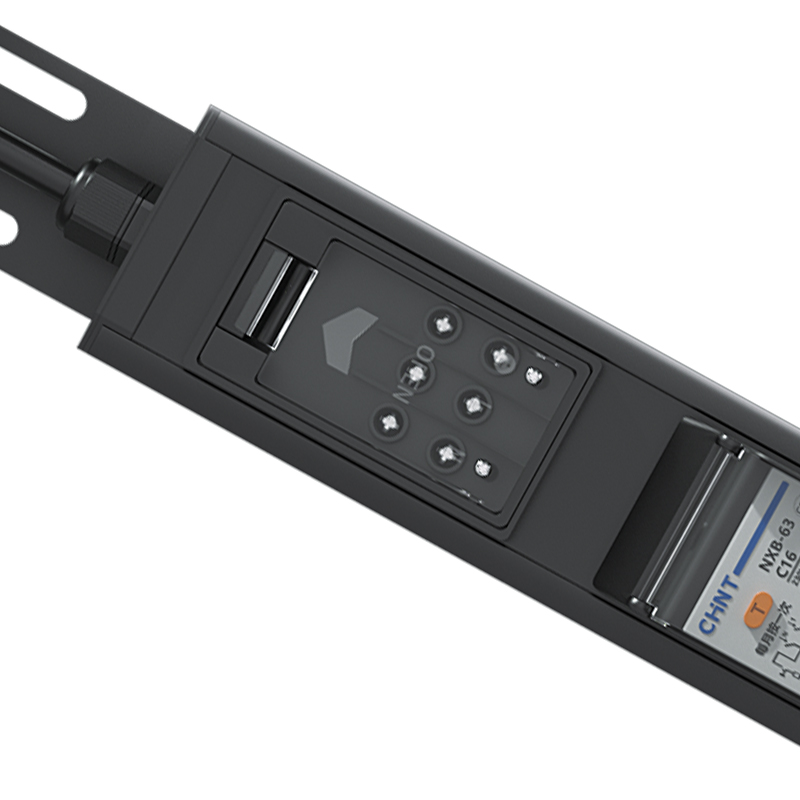
Audit the nameplate ratings of existing rack equipment. Compare this to the actual power draw under load. Nameplate ratings show maximum theoretical draw, while actual usage is often much lower. To calculate capacity, multiply the voltage by the amperage to get the total wattage. Electrical codes require derating continuous loads to 80% of the circuit maximum. For example, a standard 20A circuit at 120V provides 2400W theoretically, but you should only load it to 1920W continuously.
Identify when a standard 15A or 20A unit becomes insufficient. High-density server clusters demand massive power. Blade chassis can easily max out standard circuits. In these cases, upgrade to a 32A rack mount PDU. This provides the necessary headroom for expansion. Understand single-phase versus three-phase power requirements. Most commercial office spaces use single-phase power. Large data centers utilize three-phase power for higher efficiency and better load balancing across multiple server racks.
IEC outlets serve as the standard in global IT environments. Regional NEMA standards dominate specific local markets. You must match your equipment plugs to the receptacles. Utilize a C13 C19 rack mount PDU to safely mix devices. Low-power devices like switches connect via C13 outlets, which handle up to 10A or 15A depending on the region. High-power devices like enterprise servers connect via C19 outlets, which handle up to 16A or 20A.
You can run everything on the same strip safely. The physical design of these outlets prevents administrators from accidentally plugging a high-draw device into a low-capacity receptacle. Deploying a multi standard rack mount PDU offers operational flexibility. It supports heterogeneous hardware environments easily. Mixed-use labs benefit heavily from having various outlet types available on a single power strip, reducing the need to deploy multiple separate units.
Receptacle Type | Max Amperage (US/Global) | Common Equipment |
|---|---|---|
IEC C13 | 15A / 10A | Network switches, 1U servers, routers |
IEC C19 | 20A / 16A | Blade servers, large UPS units, storage arrays |
NEMA 5-20R | 20A / N/A | Standard IT equipment with US wall plugs |
Match the input plug to your existing wall receptacles. Common types include NEMA L5-20P, L6-30P, and IEC 309. Alternatively, match it to the output receptacles of your rack's UPS. Mismatched plugs cause immediate deployment delays. Pay attention to locking plug designations. An "L" in the NEMA standard indicates a locking plug.
Locking plugs require a physical twist to disconnect. This prevents heavy power cables from vibrating loose over time. Consider the physical constraints of facility upgrades. Requiring an electrician to install new dedicated circuits adds significant installation time. Plan your power distribution around existing infrastructure whenever possible to streamline your deployment schedule.
Implement strict load balancing practices. Distribute heavy-draw servers evenly across multiple branches within the unit. Do not plug all storage arrays into a single breaker bank. If one branch trips, you lose all connected storage simultaneously. Spread the load to maintain stability. In three-phase systems, balance the load across L1, L2, and L3 to prevent phase imbalances that can damage upstream transformers.
Set up SNMP or email alerts on metered units. These notifications warn administrators before a breaker trips. You can configure thresholds at 70% and 80% load capacity. Proactive monitoring prevents unexpected downtime during peak processing hours. When an alert triggers, you can migrate virtual machines to different physical hosts to reduce the power draw on that specific circuit.
Route thick, rigid power cables carefully. A 10 AWG power cable has a wide bend radius and requires careful handling. Do not obstruct server exhaust fans. Blocked airflow creates dangerous thermal hotspots inside the cabinet. Use vertical cable managers to keep cords organized and out of the airflow path. Keep data cables and power cables physically separated to prevent electromagnetic interference.
Locking receptacles provide extra security. Retention clips prevent accidental disconnects during routine rack maintenance. A bumped power cord should never take down a production server. Secure every power cord with locking sleeves or integrated retention mechanisms. Never use plastic zip ties on power cables, as they can pinch the internal copper shielding. Use hook-and-loop fasteners instead.
Deploy dual units connected to separate power sources. Connect one to Utility plus UPS A. Connect the other to UPS B. This supports servers equipped with redundant power supplies. If one UPS fails, the server continues running seamlessly on the secondary feed. Never plug both power supplies of a single server into the same power strip.
Utilize color-coded housings and power cords. Visually distinguish between A and B power feeds easily. Use red cords for the A feed and blue cords for the B feed. This reduces human error during maintenance windows. It mitigates the risk of a single point of failure in the power chain. Technicians can instantly identify which power path they are working on without tracing cables through a dark rack.
Audit your existing server rack to document the nameplate power draw and plug types of all installed hardware.
Calculate your total required wattage and apply an 80% derating factor to determine the correct amperage for your new power distribution hardware.
Map out your physical rack space to confirm whether a horizontal 1U/2U or a vertical 0U form factor fits your enclosure.
Consult a licensed facility electrician to verify that your wall receptacles and circuit breakers match your intended input plugs.
A: A 1U horizontal unit mounts like a server, taking up one standard rack space. It works well for small wall-mount cabinets. A 0U vertical unit mounts in the rear space of a tall rack, preserving valuable equipment slots for servers and switches.
A: It depends on your equipment density. Standard 15A or 20A circuits handle basic switches and a few servers. If you run high-density blade servers or multiple large storage arrays, a 32A unit provides the necessary power capacity to prevent overloaded circuits.
A: This unit features a mix of different receptacle types, such as NEMA and IEC outlets, on the same strip. Use it in heterogeneous environments where you need to plug in diverse hardware without deploying multiple separate power strips.
A: C13 and C19 are global IT standards designed specifically for computer hardware. They support higher voltages and offer locking mechanisms. Mixing C13 for low-power gear and C19 for high-draw servers provides maximum flexibility.
A: Yes. Plugging the unit into an Uninterruptible Power Supply (UPS) distributes battery-backed power to multiple servers. Ensure the UPS output capacity exceeds the combined maximum draw of all connected devices to prevent overload.
A: Daisy-chaining allows you to link multiple intelligent units together using standard network cables. They share a single IP address and connect to your main switch via one port, saving valuable network infrastructure resources.
A: High-quality enterprise units typically last between 5 and 10 years. Their lifespan depends on operating temperatures, load consistency, and the durability of internal components like relays and thermal-magnetic circuit breakers.


